Simple WolfSSL Client Side Example
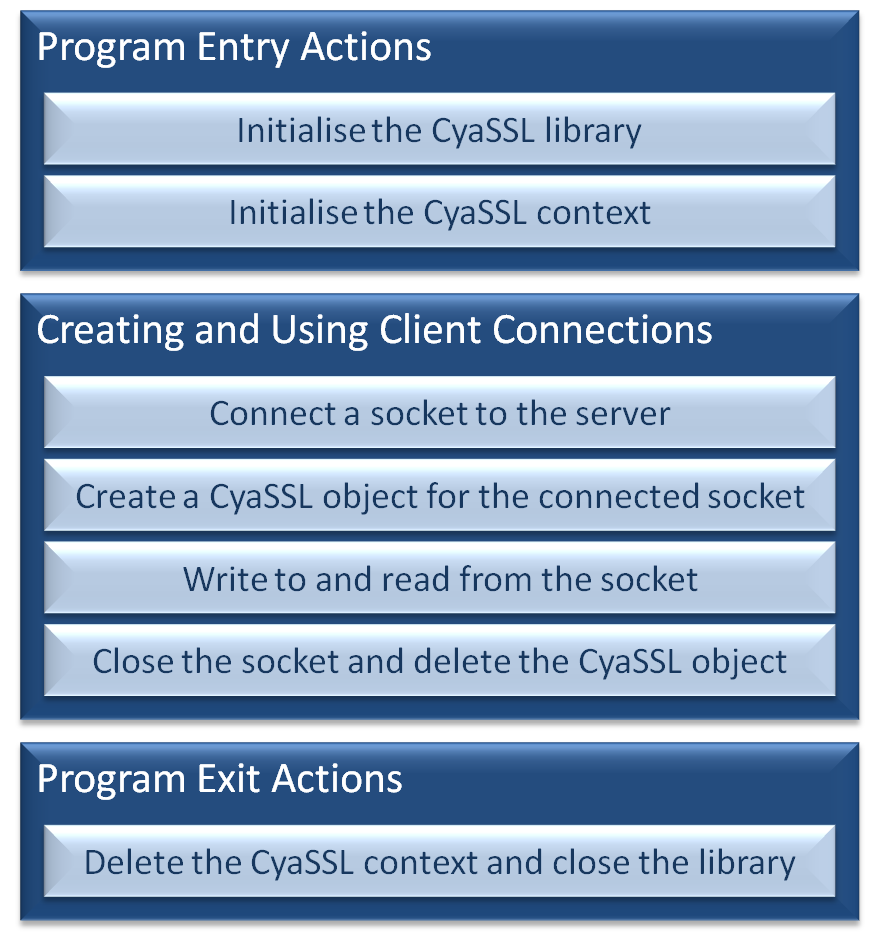
The three steps to using WolfSSL in a client side application
Introduction
This page describes how, in just a few easy steps, the WolfSSL library can be used to
to ensure the security and integrity of a client side networking application.
Header files
wolfssl/ssl.h contains the WolfSSL structures, data definitions, and function
prototypes. It must be included in all the source files that use the
WolfSSL library.
#include "wolfssl/ssl.h"


The header file that must be included in all source files that use the WolfSSL library
Initialising the library and creating a WolfSSL context
wolfSSL_Init() prepares the WolfSSL library for use, and must be
called before any other WolfSSL API functions.
Next, a variable of type WOLFSSL_CTX is required to store context information,
and can be created using wolfSSL_CTX_new(). The SSL or TLS protocol
to use is specified as the context is created using the function's
parameter. Options include SSLv3, TLSv1, TLSv1.1, TLSv1.2, or DTLS.
This example demonstrates the TLSv1 client protocol being selected. The values
to use to select the other protocol options are listed in the user manual.
The final initialisation step is loading a
Certificate Authority (CA) into the WolfSSL context. This allows authentication with the server
the client will connect to. wolfSSL_CTX_load_verify_locations()
is used for this purpose. In the example below, the first function parameter
specifies the context into which the
CA is loaded, and the second the CA certificate that is used. The third
parameter can be used to specify a file path that will be searched for
certificates, but in this case the file path is not necessary and so set to 0.
WOLFSSL_CTX* xWolfSSL_Context;
wolfSSL_Init();
xWolfSSL_Context = wolfSSL_CTX_new( CyaTLSv1_client_method() );
if( xWolfSSL_Context != NULL )
{
wolfSSL_CTX_load_verify_locations( xWolfSSL_Context, "ca-cert.pem", 0 );
}
Library initialisation, protocol selection, and loading the CA certificate
Associating a WolfSSL object with a connected socket
Each TCP connection must be associated with a WolfSSL object.
WolfSSL objects are created using
wolfSSL_new(), and associated
with a TCP socket using
wolfSSL_set_fd().
WOLFSSL* xWolfSSL_Object;
if( connect( sockfd, (SA *) &servaddr, sizeof( servaddr ) ) == 0 )
{
xWolfSSL_Object = wolfSSL_new( xWolfSSL_Context );
if( xWolfSSL_Object != NULL )
{
wolfSSL_set_fd( xWolfSSL_Object, sockfd );
}
}
Creating a WolfSSL object, and associating it with a connected socket
Using the socket
Secure communication can now be made through the socket by using
wolfSSL_write() in place of the standard sockets
write() or
send() functions,
and
wolfSSL_read() in place of the standard sockets
read() or
recv().
Note that the first parameter to both wolfSSL_write() and wolfSSL_read()
is not the socket descriptor, but the WolfSSL object that is associated with
the socket descriptor.
char ucTxBuf[ MAXLINE ], ucRxBuf[ MAXLINE ];
if( wolfSSL_write( xWolfSSL_Object, ucTxBuf, strlen( ucTxBuf ) ) != strlen( ucTxBuf ) )
{
}
if( wolfSSL_read( xWolfSSL_Object, ucRxBuf, MAXLINE ) <= 0 )
{
}
Writing to and reading from a socket using the WolfSSL API
Deleting allocated resources
WolfSSL API functions that result in dynamic resource allocation have a counterpart
function that should be called to free the resource when it is no longer required.
The code snippet below shows how the objects created in this small example should be freed.
wolfSSL_free( xWolfSSL_Object );
wolfSSL_CTX_free( xWolfSSL_Context );
wolfSSL_Cleanup();
Deleting objects that were dynamically allocated in this example
Copyright (C) Amazon Web Services, Inc. or its affiliates. All rights reserved.