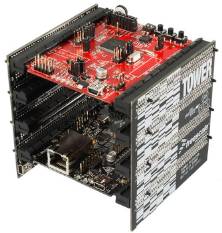
Freescale MCF51CN128 ColdFire V1
Including a uIP Embedded Web Server Example
[Embedded Ethernet Examples]
The demo presented on this page uses:
- CodeWarrior for microcontrollers V6.2.2 or later. The free CodeWarrior 'special' edition can be used.
- The Freescale Tower development system.
- Adam Dunkels open source uIP embedded TCP/IP stack.
uIP is a tiny and simple TCP/IP implementation written by Adam Dunkels. The configuration used by the MCF51CN128
demo application uses just 8.3Kbytes of Flash space.
uIP is licensed separately from FreeRTOS. Users must familiarise themselves with the uIP license.
FreeRTOS has made some modifications to the uIP stack since this demo was created. See the Embedded Ethernet Examples List page for more information.
Freescale also provide source code to a FreeRTOS demo that uses lwIP, along with
a comprehensive application note.
IMPORTANT! Notes on using the ColdFire V1 Web Server Demo
Please read all the following points before using this RTOS port.
- Source Code Organisation
- The Demo Application
- RTOS Configuration and Usage Details
See also the FAQ My application does not run, what could be wrong?
Source Code Organisation
The CodeWarrior workspace for the MCF51CN128 demo is located in the FreeRTOS/Demo/ColdFire_MCF51CN128_CodeWarrior directory.
The FreeRTOS zip file download contains the files for all the ports and demo application projects. It therefore contains many more
files than used by this demo. See the Source Code Organization section for a description
of the downloaded files and information on creating a new project.
The Demo Application
web server configuration
The IP address used by the demo is set by the constants configIP_ADDR0 to
configIP_ADDR3 within the file FreeRTOS/Demo/ColdFire_MCF51CN128_CodeWarrior/Sources/FreeRTOSConfig.h. The MAC address and net mask are configured
within the same header file.
The IP addresses used by the web browser computer and the ColdFire development board must be compatible.
This can be ensured by making the first three octets of both IP addresses identical.
For example, if the web browser computer uses IP address
192.168.100.1, then the development board can be given any address in the range 192.168.100.2 to 192.168.100.254 (barring
any addresses already present on the network).
Opening the demo application project
Select �Open� from the CodeWarrior �File� menu, then navigate to FreeRTOS/Demo/ColdFire_MCF51CN128_CodeWarrior and open
RTOSDemo.mcp. Note that this is a project file, not a workspace file, so do not use the �Open Workspace� menu item.
Note: CodeWarrior often thinks it knows better than you which files you want to
build - and changes the port.c and portasm.S files included in the project from
the ColdFire V1 versions to the x86 versions. If you get lots of errors output
when either file is compiled then delete the two files from the project and then
add back in the port.c and portasm.S files that are located in the
FreeRTOSSourceportableGCCColdFire_V1 directory.
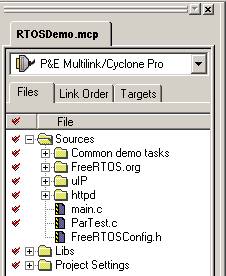 The project folder organisation
The project source files are organized into the following groups:
- FreeRTOS - contains the FreeRTOS source files themselves comprising of queue.c, tasks.c, list.c,
port.c and portasm.S.
- Common demo tasks - contains source files that define a set of example tasks that are used by all
FreeRTOS demos. The tasks do nothing other than provide examples of how the FreeRTOS API can be used
and test the FreeRTOS port.
- uIP - Contains the source code for the uIP TCP/IP stack. Note that uIP is licensed separately from
FreeRTOS and uses a liberal BSD style license.
- httpd - The implementation of a basic HTTP server that includes a simple CGI scripting interface.
Building and downloading the demo application
- Set the IP address and MAC address within FreeRTOSConfig.h.
- Select �Bring Up To Date� from the �Project� menu within CodeWarrior. The source code should build and
link with no errors or warnings.
- Connect your host computer to the Tower evaluation hardware using either a P&E Micro USB BDM interface,
or directly using the Open Source BDM interface that is included on the Tower hardware itself. Ensure that
the interface shown in the CodeWarrior IDE matches the interface actually be used - as highlighted in red in
image below.
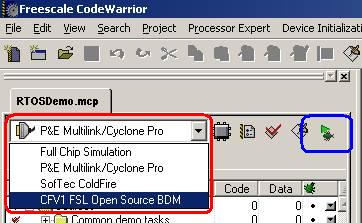 Selecting the debug interface
- Click the green Debug speed button (highlighted in blue in the image above) to program the application into
the microcontroller flash memory and start a debug session.
Functionality
The demo creates 24 tasks as follows:
- Flash tasks - LED2, LED3 and LED4 are under the control very simple 'flash' tasks. Each LED will flash
at a constant but different frequency. These simple tasks are included to provide some visual feedback
that the application is executing.
- uIP task - this task executes the uIP TCP/IP stack and implements the simple web server.
- Register test tasks - these tasks repeatedly fill the MCU registers with known values, and then check
that the known values still exist where expected. The tasks run at the lowest priority so will be pre-empted
regularly. Their purpose is to test that the context switch process is functioning correctly.
- All other tasks - all the other tasks are part of the �common demo tasks' and are not specific to the
MCF51CN128 demo. They demonstrate the FreeRTOS API and test the FreeRTOS port, but perform no other useful
function.
Each common demo task includes a self checking mechanism that will detect unexpected or erroneous behavior. Every
5 seconds a tick hook function (a function that is called from
the RTOS tick interrupt) will query each standard demo task to determine the system status. The system status
can be viewed on the Task Status page using a web browser.
uIP and the embedded web server
uIP was designed specifically to use as little RAM as possible. It normally defines a single buffer that is then
used for both reception and transmission. It is possible to reduce the buffer size to just a few hundred bytes,
but doing so will severely impact performance. In this demo uIP does not define its own buffer but instead re-uses
the DMA buffers that are allocated by the FEC driver - resulting in zero copy operation.
The tiny RAM usage of uIP imposes a restriction on throughput as there can only ever be a single packet outstanding
on the network at any one time. The effect of this is most significant when uIP is used to communicate with a
TCP/IP stack that implements a delayed ack policy. In its standard configuration this can result in a delay of some
200ms between packets, but there are several methods of increasing performance considerably. One method is to simply
send each packet twice - forcing an immediate acknowledgement from the peer. This obviously increases the network
traffic but can have negligible effect on the processing required by the microcontrollers if (as in this case) a DMA
is used. Another method is to split each packet into two smaller packets - again forcing an immediate acknowledgement
from the peer. This can be done at the driver level and so transparently to the user, but does impact the processing
overhead as it doubles the number of checksum calculations required. This demo uses the first method.
Using the web server
To connect to the web server first ensure a suitable Ethernet cable is used. A standard cable can be used if the
connection is being made through a hub. A cross over (point to point) cable should be used if a direct connection
is to be made without a hub.
Type �http://192.168.0.5� into the address bar of your web browser, substituting this example IP address for the actual
IP address assigned within FreeRTOSConfig.h.
The pages that are served by the MCF51CN128 are located in the
FreeRTOS/Demo/ColdFire_MCF51CN128_CodeWarrior/Sources/httpd/httpd-fs directory. The web content is then converted to
const structs using the makefsdata Perl script (which itself is located in the httpd directory). The const structs are
built into the program image so a change in the served pages necessitates a rebuild.
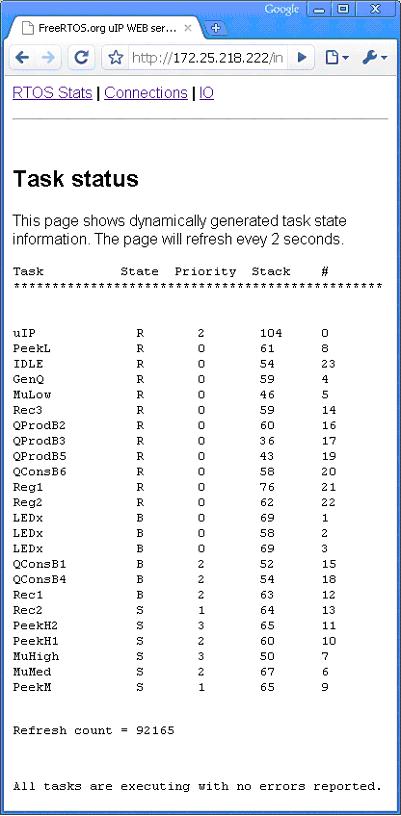 The served task status page
The task status page displays a table containing information on the status of each task, a count of the number
of times the page has refreshed, and the overall system status (from the check function). The page will
automatically refresh every few seconds.
The following information is displayed for each task:
- Name - This is the name given to the task when the task was created.
- State - Represents the state of the task as follows:
- 'B'locked,
- 'R'eady,
- 'S'uspended or
- 'D'eleted [awaiting clean up].
- Priority - This is the priority the task is currently executing at.
- Stack - Shows the �high water mark' of the task stack. This is the minimum amount of free stack that has
been available during the lifetime of the task. The closer this value is to zero the closer the task has
come to overflowing its stack.
- Num - This is just a unique number that is assigned to each task. It has no purpose other than to help
identify tasks when more than one task has been assigned the same name.
The served IO page
The IO page provides a simple demonstration of the uIP CGI scripting facility. It allows the state of LED1 to
be both queried and set using a web browser.
RTOS port specific configuration
Configuration items specific to this demo are contained in FreeRTOS/Demo/ColdFire_MCF51CN128_CodeWarrior/Sources/FreeRTOSConfig.h. The
constants defined in this file can be edited to suit your application. In particular -
- configTICK_RATE_HZ
This sets the frequency of the RTOS tick. The supplied value of 1000Hz is useful for
testing the RTOS kernel functionality but is faster than most applications require. Lowering this value will improve efficiency.
- configKERNEL_INTERRUPT_PRIORITY and configMAX_SYSCALL_INTERRUPT_PRIORITY
See the RTOS kernel configuration documentation for full
information on these configuration constants. It is not advisable to change the default values for these two constants
on the ColdFire V1 core.
Each port #defines 'BaseType_t' to equal the most efficient data type for that processor. This port defines
BaseType_t to be of type long.
Note that vPortEndScheduler() has not been implemented.
Interrupt service routines
Interrupt service routines can be written exactly as described in the compiler documentation and have no special
requirements.
The macro portEND_SWITCHING_ISR() is provided to allow an interrupt service routine to request a context switch.
This would be desirable where an interrupt caused a task to unblock, and the unblocked
task had a priority that was higher than the currently executing task. In this case calling portEND_SWITCHING_ISR()
from within the interrupt service routine would cause the interrupt to return directly to the unblocked task.
See the interrupt handler called vFECISRHandler() defined within FreeRTOS/Demo/ColdFire_MCF51CN128_CodeWarrior/Sources/FEC.c
for a complete example.
Switching between the pre-emptive and co-operative RTOS kernels
Set the definition configUSE_PREEMPTION within FreeRTOS/Demo/ColdFire_MCF51CN128_CodeWarrior/Sources/FreeRTOSConfig.h to 1 to use pre-emption or 0
to use co-operative.
Compiler options
As with all the ports, it is essential that the correct compiler options are used. The best way to ensure this is to base your
application on the provided demo application files.
Memory allocation
Source/Portable/MemMang/heap_2.c is included in the demo application project to provide the memory
allocation required by the RTOS kernel.
Please refer to the Memory Management section of the API documentation for
full information.
Copyright (C) Amazon Web Services, Inc. or its affiliates. All rights reserved.