ColdFire V2 RTOS Demo
Using Eclipse and GCC
[RTOS Ports]
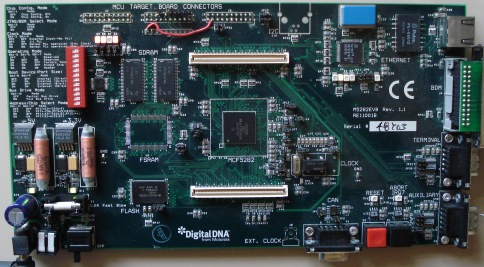
This page presents the new FreeRTOS port and demo application for the
V2 ColdFire core
from Freescale. This new port, first provided with FreeRTOS V5.0.4, has extended functionality and therefore supersedes ports
provided in previous versions.
The previous V2 port has been retained in the FreeRTOS download but is not recommended for new designs. The new port is almost
a 'drop in' replacement so upgrading old designs should be simple, with only the interrupt service routine semantics (described on
this page) requiring some consideration (writing interrupts is now simpler).
Port highlights include full interrupt nesting support and no special coding requirements when writing interrupt service routines.
The port and demo are preconfigured to use:
IMPORTANT! Notes on using the V2 ColdFire RTOS port
Please read all the following points before using this RTOS port.
- Source Code Organization
- The Demo Application
- Configuration and Usage Details
See also the FAQ My application does not run, what could be wrong?
Source Code Organization
The FreeRTOS download contains the source code for all the FreeRTOS ports so contains many more files than used by this demo.
See the Source Code Organization section for a description of the
downloaded files and information on creating a new project.
The Eclipse workspace for the ColdFire MCF5282 Eclipse demo is contained in the FreeRTOS/Demo/ColdFire_MCF5282_Eclipse directory.
NOTE: Please follow these instructions carefully to install and configure Eclipse correctly for use with this demo application.
Instructions for opening the Eclipse workspace are provided within the "Demo Application" section of this page.
The Demo Application
Demo application hardware setup
The linker script is configured to place executable code in the M5282EVB SDRAM (not the fastest place to run code from!) and data in the internal SRAM of the MCF8252 itself.
All switches in the SW1 bank can therefore be set to their 'ON' position.
The demo application uses the LEDs built onto the evaluation board so jumpers JP12 to JP15 should be in place.
The demo application includes an interrupt driven UART test where one task transmits characters that are then received by another task.
For correct operation of this functionality a loopback connector must be fitted to the AUXILIARY connector of the M5282EVB hardware (pins
2 and 3 must be connected together on the 9Way connector - a paper clip is normally sufficient for the purpose).
Functionality
The demo application creates 42 tasks before starting the RTOS scheduler (including the idle task), then repeatedly dynamically creates and deletes a further two tasks
when the RTOS kernel is running.
The standard demo tasks do not perform any particular function other than to serve as usage examples for each FreeRTOS API function.
When executing correctly the demo will behave as follows:
- LEDs marked D6, D7 and D8 are under control of the very simple 'flash' tasks. Each will flash at a constant frequency, with LED D6 being
the fastest and LED D8 being the slowest.
- Most of the tasks do not update an LED so have no visible indication that they are operating correctly.
Therefore a 'Check' task is created whose job it is to ensure that no errors have been detected in any of the
other tasks. The check task only executes every few seconds, but has a high priority so is guaranteed to get processing time when required.
The check task will toggle LED D9 once every 5 seconds if all the demo tasks are executing as expected. The toggle rate will increase to
500ms should an error be detected in any task. This mechanism can be tested by removing the loopback connector from the AUXILIARY port to
deliberately generate an error.
More information is provided in the comments of the code itself.
The RTOS kernel is configured to use interrupt priority level 1. The UART uses interrupt priority level 2. Interrupt nesting is further exercised by
the 'IntQueue' test whereby one task and two interrupts all access the same two queues. The two interrupts run at priority levels 4 and 3 respectively
so the maximum possible interrupt nesting depth is 4. See the RTOS Configuration and Usage section for a more complete explanation
of the executing interrupts and their respective priorities.
Remember that the deeper the nesting depth you permit the greater the stack size consumed - configCHECK_FOR_STACK_OVERFLOW
needs to be set to 2 (rather than 1 as is the default for this demo) to catch overflows caused by deep nesting, but this should be used for debug purposes only as it
will slow down the context switch operation. The demo application dumbly assigns the same stack size to each task rather tuning each stack to ensure RAM is not wasted.
Building and executing the demo application
A 'standard make' Eclipse project is used. This means the files to build and the build options are detailed within a standard makefile which can be viewed and
edited using the Eclipse IDE. The optimisation level is set by the OPTIM definition at the very top of the makefile.
- To build the demo application:
-
Ensure you have the CodeSourcery compiler correctly
installed, and that the compilers bin directory is included within your host systems PATH environment variable.
-
Ensure you have installed and configured Eclipse exactly as described in these instructions.
-
Start the Eclipse workbench IDE - at which point you will be prompted for a workspace location.
The Eclipse workspace for the ColdFire MCF5282 Eclipse demo is contained in the FreeRTOS/Demo/ColdFire_MCF5282_Eclipse directory. This is therefore the directory that
should be selected when Eclipse asks you for a workspace location, as depicted below.
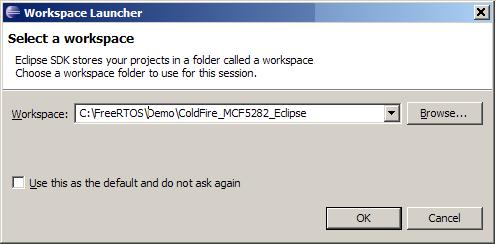 Opening the Eclipse workspace - obviously use the path that is correct for your
installation, which might not be the same as that shown here
Opening the Eclipse workspace - obviously use the path that is correct for your
installation, which might not be the same as that shown here
-
Make sure you set the "FreeRTOS_ROOT" variable to point to your FreeRTOS installation (again, this is described here).
-
Select "Build All" from the Eclipse "Project" menu item. The demo should build with no errors or warnings.
- To run the demo application:
-
Ensure your M5282EVB is correctly connected to your host computer using a BDM interface supported by the CodeSourcery debug sprite.
-
Press the down arrow next to the speed button that shows a little bug, then select RTOSDemo from the menu.
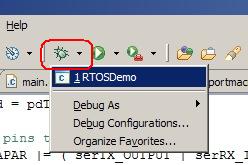 Launching the RTOSDemo debug session
You should be taken to the Eclipse Debug perspective, if you are not already there.
Wait for the program to be loaded into the
evaluation board RAM - a progress bar in the bottom right corner of the IDE will show you when this is complete.
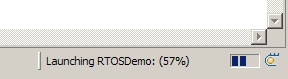 Waiting for the program to load
Once loaded the program should break on entry to main(). The Eclipse IDE can then be used to step through the code, view variables, view memory, etc, just as any other debug IDE.
Manually remove the breakpoint at main() as a new break point will be added each time a debug session is started.
The WITTENSTEIN provided FreeRTOS Eclipse Plug-in can be used to view task and queue state information:
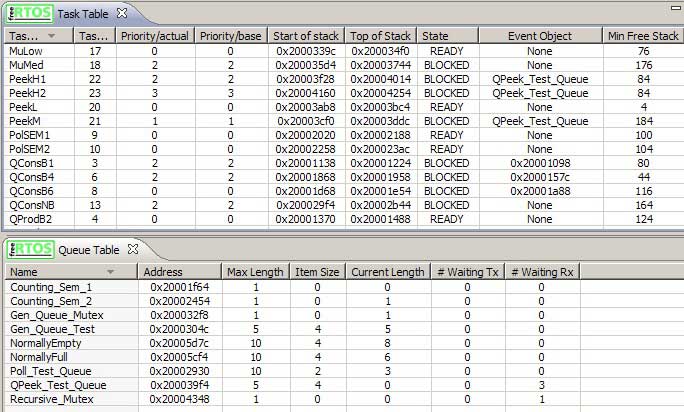 Using the FreeRTOS Eclipse plug-in viewer
RTOS port specific configuration
Configuration items specific to this demo are contained in FreeRTOS/Demo/ColdFire_MCF5282_Eclipse/RTOSDemo/FreeRTOSConfig.h. The
constants defined in this file can be edited to suit your application. In particular -
- configKERNEL_INTERRUPT_PRIORITY and configMAX_SYSCALL_INTERRUPT_PRIORITY
See the interrupt configuration section of the RTOS kernel configuration documentation for full information on
these options.
configKERNEL_INTERRUPT_PRIORITY sets the interrupt priority used by the RTOS kernel itself. configMAX_SYSCALL_INTERRUPT_PRIORITY sets the highest interrupt priority
from which queue and semaphore API functions can be called (note that only API functions that end in FromISR() can be called from within an ISR).
configKERNEL_INTERRUPT_PRIORITY should be set to the lowest priority.
Interrupts above configMAX_SYSCALL_INTERRUPT_PRIORITY will not be masked out by RTOS kernel critical sections and will therefore be unaffected
by RTOS kernel activity - within the limitations imposed by the hardware itself.
By way of demonstration, the demo application defines configMAX_SYSCALL_INTERRUPT_PRIORITY to be 4 and configKERNEL_INTERRUPT_PRIORITY to be 1.
Each port #defines 'BaseType_t' to equal the most efficient data type for that processor. This port defines
BaseType_t to be of type long.
Note that vPortEndScheduler() has not been implemented.
Writing interrupt service routines
The CodeSourcery libraries populate the interrupt vector table with default handlers - each of which is called
__cs3_isr_interrupt_xx(), where 'xx' is the vector number. You can override the default handler by
simply providing your own definition of the handler function. For example, the UART1 peripheral uses vector
number 78 - to provide your own UART1 handler simply provide your own definition of a function called
__cs3_isr_interrupt_78().
Interrupt service routines have no special requirements and can be written as per the compiler documentation.
The macro portEND_SWITCHING_ISR() can be used to ensure an interrupt always returns to the highest priority
ready state task - tasks can be unblocked by an ISR so the highest priority ready task at the end of an ISR
might be different to the highest priority ready/running task when the ISR was entered.
The UART1 interrupt (listing 1 below) within the MCF5282 demo can be used as an example:
/* The function prototype must use the 'interrupt' attribute.*/
void __attribute__( ( interrupt ) ) __cs3_isr_interrupt_78( void );

Next provide the ISR function, with the correct vector number in the name.

NOTE: This is NOT intended to be an example of an efficient ISR. It is provided
only to demonstrate using queues from within interrupts.  Great efficiency
improvements would be gained by simply placing received characters in a RAM
buffer, then using a single write to a semaphore to unblock a task if required.
void __cs3_isr_interrupt_78( void )
{
unsigned char ucChar;
BaseType_t xHigherPriorityTaskWoken = pdFALSE, xDoneSomething = pdTRUE;

    while( xDoneSomething != pdFALSE )
    {
        xDoneSomething = pdFALSE;

        /* Does the tx buffer contain space? */
        if( ( MCF_UART1_USR & MCF_UART_USR_TXRDY ) != 0x00 )
        {
            /* Are there any characters queued to be sent? */
            if( xQueueReceiveFromISR( xCharsForTx, &ucChar, &xHigherPriorityTaskWoken )
                                                                            == pdTRUE )
            {
                /* Send the next char. */
                MCF_UART1_UTB = ucChar;
                xDoneSomething = pdTRUE;
            }
            else
            {
                /* Turn off the Tx interrupt until such time as another character
                is being transmitted. */
                MCF_UART1_UIMR = serRX_INT;
                xTxHasEnded = pdTRUE;
            }
        }

        /* Any characters in the receive buffer? */
        if( MCF_UART1_USR & MCF_UART_USR_RXRDY )
        {
            /* Queue the character for processing by a task? */
            ucChar = MCF_UART1_URB;
            xQueueSendFromISR( xRxedChars, &ucChar, &xHigherPriorityTaskWoken );
            xDoneSomething = pdTRUE;
        }
    }

    /* Finally we call portEND_SWITCHING_ISR().  This ensures that the interrupt
    returns to the highest priority ready task - which may not be the currently running
    task if reading from or writing to a queue causes a task of higher priority to
    unblock. */
    portEND_SWITCHING_ISR( xHigherPriorityTaskWoken );
}
Listing 1: An example ISR
Resources used by the RTOS kernel
The RTOS kernel uses the PIT0 timer to generate the RTOS tick. The function vApplicationSetupInterrupts() can be altered to use any convenient timer source.
In RTOS addition the RTOS kernel requires one additional interrupt vector. As delivered vector 16 on interrupt controller 0 is used as on the MCF5282 vector 16
is not used by any peripherals and is therefore spare. The RTOS kernel uses this vector in conjunction with the Interrupt Force Register 0 (INTFRCL0).
For reasons of efficiency the RTOS kernel assumes it has exclusive access to this register and therefore does not attempt to maintain its state - although this
behaviour can be easily altered by using bitwise sets and clears on the register rather than writing to the register in its entirety.
To allow users the flexibility to change vector assignments both the PIT0 and vector 16 configuration is performed in a file called FreeRTOS_tick_setup.c
which is included as part of the user application, rather than part of the fixed RTOS kernel code.
Critical sections
Exiting a critical section will always set the interrupt priority such that all interrupts are enabled, no matter what its level when the critical section
was entered. FreeRTOS API functions themselves will use critical sections.
Execution context
For reasons of efficiency, tasks run with Supervisor privileges.
Switching between the pre-emptive and co-operative RTOS kernels
Set the definition configUSE_PREEMPTION within FreeRTOS/Demo/ColdFire_MCF5282_Eclipse/RTOSDemo/FreeRTOSConfig.h to 1 to use pre-emption or 0
to use co-operative. The demo application will only execute correctly with configUSE_PREEMPTION set to 0 if configIDLE_SHOULD_YIELD is set to 1.
Compiler options
As with all the ports, it is essential that the correct compiler options are used. The best way to ensure this is to base your
application on the provided demo application files.
Memory allocation
Source/Portable/MemMang/heap_2.c is included in the ColdFire demo application project to provide the memory
allocation required by the RTOS kernel.
Please refer to the Memory Management section of the API documentation for
full information.
Copyright (C) Amazon Web Services, Inc. or its affiliates. All rights reserved.