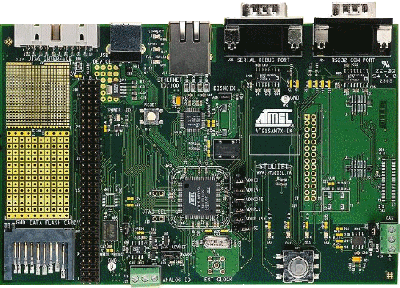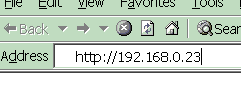
FreeRTOS has made some modifications to the uIP stack since this demo was created. See the Embedded Ethernet Examples List page for more information. This demo -
Note: If this project fails to build then it is likely the version of IAR Embedded Workbench being used is too old. If this is the case, then it is also likely that the project file has been (silently) corrupted and will need to be restored to its original state before it can be built even with an updated IAR version. IMPORTANT! Notes on using the SAM7X Web Server DemoPlease read all the following points before using this RTOS port.See also the FAQ My application does not run, what could be wrong? Source Code OrganisationThe FreeRTOS download contains the source code for all the FreeRTOS ports, so contains more files than used by this demo. See the Source Code Organization section for a description of the downloaded files and information on creating a new project.This SAM7X Web Server demo uses the standard FreeRTOS IAR SAM7 port. The uIP IAR demo project workspace rtosdemo.eww can be found in the Demo/uIP_Demo_IAR_ARM7 directory and should be opened from within the Embedded Workbench IDE. The Demo/uIP_Demo_IAR_ARM7/SrcIAR and the Demo/uIP_Demo_IAR_ARM7/resource directories contain support files for the Atmel libraries and build environment. Adam Dunkels uIP code is located in the Demo/uIP_Demo_IAR_ARM7/uIP directory. The HTML files used with the demo can be found in the Demo/uIP_Demo_IAR_ARM7/uIP/fs directory. Finally the Demo/uIP_Demo_IAR_ARM7/EMAC directory contains the EMAC driver. The Demo ApplicationDemo application setupConnect the AT91SAM7X-EK prototyping board to a computer running a web browser either directly using a point to point (crossover) cable, or via a hub/router using a standard Ethernet cable. The prototyping board should also allow the use of a standard Ethernet cable when connecting point to point, but I have not tested this configuration.The IP address used by the demo is set by the constants UIP_IPADDR0 to UIP_IPADDR3 within the file Demo/uIP_Demo_IAR_ARM7/uIP/uipopts.h. The IP addresses used by the web browser computer and the prototyping board must be compatible. This can be ensured by making the first three octets of both IP addresses identical. For example, if the web browser computer uses IP address 192.168.100.1, then the prototyping board can be given any address in the range 192.168.100.2 to 192.168.100.254 (barring any addresses already present on the network). The MAC address used by the demo is set by the constants UIP_ETHADDR0 to UIP_ETHADDR5, also within uipopts.h. You must ensure that the configured MAC address is unique on the network to which the prototyping board is being connected. Demo/uIP_Demo_IAR_ARM7/EMAC/SAM7_EMAC.c contains the definition USE_RMII_INTERFACE. This must be set appropriately for your hardware. Setting USE_RMII_INTERFACE to 1 configures the MAC to operate in RMII mode. Setting USE_RMII_INTERFACE to 0 configures the MAC to operate in MII mode. The demo application uses the LEDs built into the prototyping board so no other hardware setup is required.
Building the demo application for debugTwo project configurations are provided. "Flash Debug" uses minimal optimisation and can easily be used with the J-Link JTAG debug interface. "Flash Release" has full optimisation (minus static clustering).
Simply open the rtosdemo.eww workspace file from within the IAR Embedded Workbench IDE, ensure flash debug is the selected
configuration (see picture below), then select 'Built Target' from the IDE 'Project' menu.
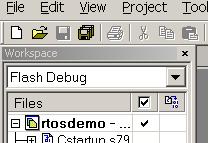
Selecting the flash debug configuration
Running the demo applicationThe IAR port cannot be executed using the IAR simulator so must be executed on the target hardware.
FunctionalityThe demo application creates 33 tasks - consisting predominantly of the standard demo application tasks (see the demo application section for details of the individual tasks). In addition there is a uIP task that implements the embedded web server, a 'Check' task and the idle task.When executing correctly the demo application will behave as follows:
Configuration and Usage DetailsHTML PagesThe HTML pages are converted to constant C structures that are built into the flash image. The Perl script Demo/uIP_Demo_IAR_ARM7/uIP/makdefsdata can be used for this purpose. The perl script requires Linux or, as I use, a Cygwin shell.
CGI ScriptsEach of the served web pages includes some dynamic data to demonstrate the use of the uIP CGI scripting facility. See the uIP documentation for further information.The RTOS CGI file generates a table containing information on each task executing within the demo. This table is interesting for demonstration purposes, but as it is necessary to leave interrupts disabled for an extended period during its creation it is not recommended for use in applications with strict real time requirements.
Web Server and EMAC OperationThe web server functionality is contained within the file Demo/uIP_Demo_IAR_ARM7/uIP_Task.c.The EMAC DMA operation makes the interaction between the EMAC peripheral and the web server task very simple. The interaction is further simplified by the single buffer memory management of uIP. The lwIP stack implements a more flexible (complex) memory management scheme, therefore the lwIP demo application contains a more comprehensive EMAC driver. Data received by the EMAC is buffered under control of the DMA. When a buffer is available for processing an EMAC interrupt is generated. All the interrupt service routine does is signal to the uIP task via a semaphore that data is available for processing. The semaphore immediately unblocks the uIP task, which processes the data and if necessary generates a response. The uIP task blocks on the semaphore with a timeout. Therefore should no data become available for processing, the uIP task will periodically unblock to carry out the periodic processing required by the TCP/IP stack. The number of receive buffers available to the EMAC is set by the constant NB_RX_BUFFERS within the file Demo/uIP_Demo_IAR_ARM7/SrcIAR/emac.h. Each receive buffer is 128 bytes. The number of transmit buffers available to the EMAC is set by the constant NB_TX_BUFFERS also within emac.h. The size of each transmit buffer is equal to the uIP buffer size. The driver included in the download uses the EMAC in its most basic configuration.
EMAC Driver Re-entrancyThe uIP task is the only task that accesses the uIP buffers, and therefore explicit re-entrancy is not required for this demo. This is in contrast to the lwIP demo, where mutual exclusion is explicitly handled by use of a semaphore at the network interface level.
PerformanceThe uIP stack only permits one packet to be unacknowledged at any one time. It waits for each packet to be acknowledged individually. Performance is therefore greatly improved by transmitting dynamically generated data as one large packet, rather than multiple small packets. This is demonstrated by the sample CGI scripts included in the source code download. The CGI script used to generate the table of tasks transmits the entire table in one packet and therefore loads quickly. The CGI scripts used to generate the table of files and the table of TCP/IP statistics both transmit each line within the respective tables individually, and therefore the pages take longer to load.
Modifications to the uIP CodeThe only modification to the standard uIP source code has been made in the function next_scriptstate() within httpd.c. The type of the variable i has been changed from u8_t to long to allow the maximum line length of CGI scripts to extend past 255 bytes.
RTOS ConfigurationThe SAM7X demo uses the standard SAM7 RTOS port. Please refer to the SAM7S demo documentation for more detailed information.NOTE! : The processor MUST be in supervisor mode when the RTOS scheduler is started (vTaskStartScheduler is called). The demo applications included in the FreeRTOS download switch to supervisor mode prior to main being called. If you are not using one of these demo application projects then ensure Supervisor mode is entered before calling vTaskStartScheduler(). MAC InterfaceEnsure USE_RMII_INTERFACE is configured appropriately for your hardware. See the Demo Application Hardware Setup notes above.Copyright (C) Amazon Web Services, Inc. or its affiliates. All rights reserved.
|
|||||||||||||||||||