Renesas RX62N Demo using GNURX (GCC) and the HEW IDE
Including an Embedded web Server Example
[Embedded Ethernet Examples]
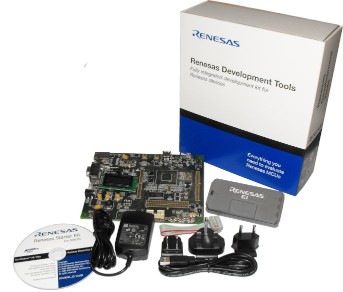 Renesas RX62N Starter Kit (RSK)
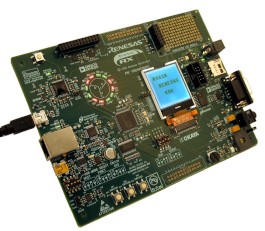 Renesas RX62N Demonstration Kit (RDK)
This is the documentation page for the Renesas RX62N
FreeRTOS port that makes use of the GNURX GCC tools,
and the Renesas HEW IDE. The FreeRTOS download includes demo applications for two
standard development boards, the
Renesas RX62N Starter Kit (RSK)
and the Renesas RX62N Demonstration Kit (RDK) boards.
Note that GNURX version 10.03 or higher is required.
Demo applications are also available for the IAR and Renesas compilers.
The demo application includes an example web server that uses a modified version of Adam Dunkels open source uIP
tiny TCP/IP stack. Code-named FreeTCPIP, the modifications allow for
higher throughput than that achievable with the original code. CGI
scripting is used to serve pages that include both RTOS and TCP/IP run time information.
uIP is licensed separately from FreeRTOS. Users must familiarise themselves with the
uIP licence, which is included at the top of each uIP source file.
IMPORTANT! Notes on using the GCC RX62N port and web server demo
Please read all the following points before using this RTOS port.
- Source Code Organisation
- The Demo Application
- RTOS Configuration and Usage Details
See also the FAQ My application does not run, what could be wrong?
Source Code Organisation
The HEW workspaces for the RDK and RSK boards are called RX600_RX62N_RDK_GNURX.hws and RX600_RX62N_RSK_GNURX.hws and can be located in the
FreeRTOS/Demo/RX600_RX62N-RDK_GNURX and FreeRTOS/Demo/RX600_RX62N-RSK_GNURX directories
of the main FreeRTOS download respectively.
The FreeRTOS zip file download contains the implementation of all the FreeRTOS ports and every demo application project.
It therefore contains many more files than used by this demo. See the
Source Code Organization section for a description
of the downloaded files and information on creating a new project.
RX62N Demo Application
Functionality
The HEW workspace contains three build configurations:
|
Build configuration
|
Description
|
|
Blinky
|
This is a very simple example that just creates two tasks. The
tasks communicate via a queue, with an LED being toggled each time
an expected value is received from the queue. The Blinky build configuration includes
main-blinky.c, the other two build configurations use
main-full.c.
|
|
Debug
|
This is a much more comprehensive demo that creates nearly 50 demo tasks. A further two tasks are then repeatedly creates and
deleted as the application runs. The tasks consist
mainly of the standard demo tasks - which don't perform any
particular functionality other than testing the port (including interrupt nesting) and demonstrating how the FreeRTOS API is used.
Information on additional tasks that are created is provided immediately below this table.
|
|
Debug_with_optimisation
|
This is similar to the 'Debug' configuration, but adds a high frequency timer test and tests that the tasks and
tests execute correctly when the optimiser is switched on.
|
The Debug and Debug_with_optimisation build configurations create the following tasks and tests in addition to the standard demo tasks:
- Check task
This only executes every five seconds but has the highest priority to ensure it gets CPU time.
Its main function is to check that all the standard demo tasks are still operational. The check function
maintains a status string that can be viewed at the very bottom of the "Task Stats" page served by the integrated web server.
It also toggles LED5 if using the RSK, or LED9 if using the RDK. If the LED controlled by the check task is toggling once every five seconds then all the
demo tasks are executing without ever reporting an error. If the toggle frequency increases to once every
200ms then an error has been detected in at least one task.
Some of the tasks check to ensure their own execution timing remains within fixed limits, and with nearly 50 tasks executing these limits can sometimes
be breached causing an error to be reported where none really exists. The timing constraints can be put under even more stress when the 20KHz interrupt
is running too. Therefore an error being reported is not necessarily indicative of an error in the FreeRTOS port, but just a symptom of a task not getting
the CPU time it requires to remain within its tight (self imposed) timing constraints.
- uIP task
This is the task that runs the TCP/IP stack. All network related processing and communication is performed in this task, making the TCP/IP
Flash footprint extremely small when compared to other embedded TCP/IP stacks.
- Reg test tasks
These two tasks fill the microcontroller registers with known
values before checking that each register still contains the written and expected value. Each of the two tasks
use different known values. The tasks run with very low priority so will get preempted very
often. If a register ever contains an unexpected value then an error has occurred - probably in the context
switching or interrupt mechanism. The reg test tasks write directly into registers and are therefore written in assembly code.
- High frequency timer test
This test configures a timer to generate an interrupt at 20KHz. The interrupt priority is above
configMAX_SYSCALL_INTERRUPT_PRIORITY so should not be
effected by anything else the RTOS kernel is doing. The jitter measured in the interrupt timing is
displayed at the bottom of the "Run Time Stats" page served by the integrated web server.
Web server configuration
The IP address used by the RX62N board is set by the constants configIP_ADDR0 to
configIP_ADDR3. These are specified at the bottom of the
FreeRTOSConfig.h header file that is located in the chosen project directory.
Constants that define the MAC address and the NET mask are located in the same place of the same file.
The IP addresses used by the web browser and the RX62N development board must be compatible.
This can be ensured by making the first three octets of both IP addresses the same.
For example, if the web browser computer uses IP address
192.168.0.1, then the RX62N development board can be given any address in the
range 192.168.0.2 to 192.168.0.254 (other
than any addresses that already exist on the same network).
The MAC address assigned to the RX62N must be unique on the network to which
it is being attached.
Building and executing the demo application
- Connect the chosen development board to a computer running a web browser either directly using a point to point (crossover)
cable, or using a standard Ethernet cable through a hub or switch (only point to point has been tested, but both should work).
- Before opening the project - if using an RSK development board connect the RSK to the host computer using an E1 JTAG interface
(provided as part of the RSK) then apply power. If using an RDK development board just connect the micro USB socket on the RDK that is marked J-Link to the host
computer - no separate power is needed. The HEW will attempt to connect to the chosen development board as the project is opened.
- Open the workspace from within the HEW IDE - following the instructions
to connect to the target interface as the project opens.
- Select "Build" from the HEW "Build" menu - the demo application should build without errors.
- When the build completes a dialogue box will appear asking if you want the compiled binary to be downloaded to the
microcontroller flash memory - select "yes" to program the flash and start a debug session.
The demo application should behave as follows (LED numbers are correct for the RSK, numbers in brackets are correct for the RDK):
- LEDs LED0, LED1 and LED2 (4, 5 and 6 on the RDK) are controlled by the standard 'flash' tasks. Each will toggle at a fixed but different frequency.
- LED5 (9 on the RDK) is controlled by the 'check' task and will toggle every 5 seconds if no errors have been detected.
- LED3 and LED4 (11, 12, 13 and 14 on the RDK) can be turned on and off interactively using the IO page served by the integrated web server.
- The integrated web server will serve the web pages described below to a standard web browser. To connect to the target:
- Open a web browser on the connected computer.
- Type "HTTP://" followed by the target IP address into the browsers address bar.
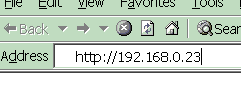 Entering the IP address into the web browser
(obviously use the correct IP address for your system)
The LCD is not used by the demo.
Served web Pages
The top of each served page includes a menu with links to every other page.
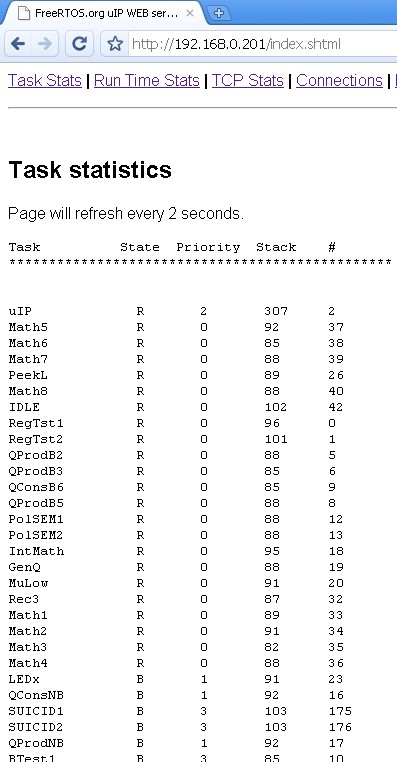
The RTOS stats page served by the RX62N web server
showing status information on each task in the system.
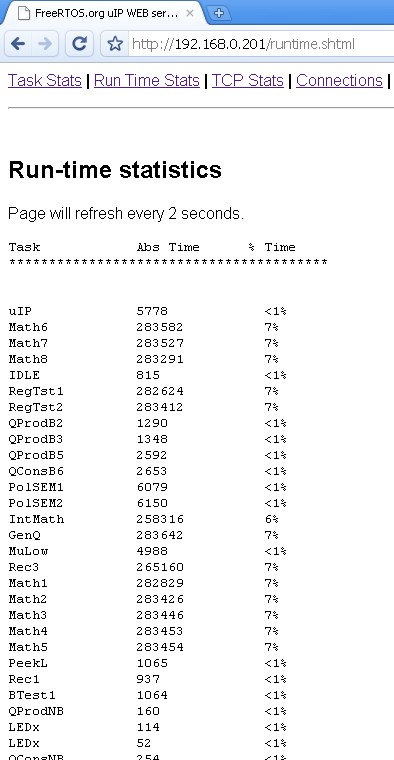
The run time stats page served by the RX62N web
server showing the processor utilisation of each task.
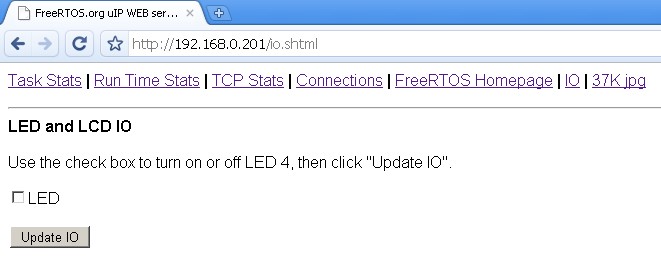
The served IO page
The IO page provides a simple interface to permit various LEDs to be turned on and off from a web browser. The LED number will be correct for the RSK only.
Changes are sent to the target board whenever the "Update IO" button is clicked.
Other served pages include TCP/IP statistics and a large JPG image. All the web pages are included in the downloaded
binary image - which can make the binary image appear to be quite large (the jpg file by itself is in excess of 36K).
RX62N RTOS port specific configuration
Configuration items specific to this demo are contained in FreeRTOS/Demo/RX600_RX62N-RSK_GNURX/RTOSDemo/FreeRTOSConfig.h or
FreeRTOS/Demo/RX600_RX62N-RDK_GNURX/RTOSDemo/FreeRTOSConfig.h for the RSK and RDK hardware respectively. The
constants defined in these file can be edited to suit your application. In particular -
- configTICK_RATE_HZ
This sets the frequency of the RTOS tick. The supplied value of 1KHz is useful for
testing the RTOS kernel functionality but is faster than most applications need. Lowering this frequency will improve efficiency.
- configKERNEL_INTERRUPT_PRIORITY
This defines the interrupt priority used by the RTOS kernel for the timer and software interrupts. This should always be set to
the lowest interrupt priority, which is 1 for the RX62N. See
the configuration pages for more information.
- configMAX_SYSCALL_INTERRUPT_PRIORITY
This defines the maximum interrupt priority from which FreeRTOS API functions can be called. Interrupts at or below this
priority can call FreeRTOS API functions provided that the API function ends in 'FromISR'. Interrupts above this
priority cannot call any FreeRTOS API functions but will not be effected by anything the RTOS kernel is doing. This makes them
suitable for functionality that requires very high temporal accuracy (motor control for example). The high frequency timer test included in the
demo application uses a priority that is above configMAX_SYSCALL_INTERRUPT_PRIORITY. See
the configuration pages for more information.
The RX62N port layer #defines 'BaseType_t' to 'long'.
Writing interrupt service routines (ISRs)
Interrupts can be written using the standard GNURX GCC compiler syntax. For example, the demo application defines the
high frequency timer using:
/* Function prototype. */
static void prvTimer2IntHandler( void ) __attribute__((interrupt));

/* Function definition. */
static void prvTimer2IntHandler( void )
{
    /* ISR implementation goes here.  This is the highest priority interrupt in
    the demo, so interrupts are just left disabled. */
}
Often an ISR wants to cause a context switch so the task that is returned to when
the ISR completes is different to the task that the ISR originally interrupted. This would
be the case if the ISR caused a task to unblock, and the unblocked task had a
priority above that of the task that was already in the Running state. This
can be achieved by calling portYIELD_FROM_ISR(), which takes a single parameter.
The parameter must be 0 if a context switch is not required, or non-zero if
a context switch is required. This is demonstrated in the code below - which is
a handler for a cascaded 8 bit timer 0 and timer 1 compare match interrupt.
/* Function prototype. */
static void vT0_1_InterruptHandler( void ) __attribute__((interrupt));

/* Function definition. */
void vT0_1_InterruptHandler( void )
{
long lHigherPriorityTaskWoken;

    /* Enable interrupts to allow interrupt nesting. */
    __asm volatile( "SETPSW	I" );

    /* xFirstTimerHandler() returns true or false, depending on whether the
    function unblocked a task that has equal or higher priority than the task
    that is already in the running state. */
    lHigherPriorityTaskWoken = xFirstTimerHandler();
    portYIELD_FROM_ISR( lHigherPriorityTaskWoken );
}
Resources used by FreeRTOS
FreeRTOS requires exclusive use of the software interrupt.
FreeRTOS also requires exclusive use of a timer that is capable of generating the tick interrupt - but
it is up to the application writer to define which timer is used. To do this
the application must define a function called vApplicationSetupTimerInterrupt() to
configure the tick interrupt using the chosen peripheral, then install vTickISR() in the corresponding
location within the interrupt vector table.
It is suggested that a compare match timer is used to generate the tick interrupt, and an example
implementation of vApplicationSetupTimerInterrupt() that uses compare match timer 0 is
included in both main-full.c and main-blinky.c within this demo application.
Vects.c (also within the demo application) then installs vTickISR() in the CMTU0_CMT0 vector (offset
0x70). It is suggested that the provided example implementations are used in most cases.
Switching between the pre-emptive and co-operative RTOS kernels
Set the definition configUSE_PREEMPTION within RTOSDemo/FreeRTOSConfig.h to 1 to use pre-emption or 0
to use co-operative. The full demo application may not execute correctly when the co-operative RTOS scheduler is
selected.
Compiler options
As with all the ports, it is essential that the correct compiler options are used. The best way to ensure this is to base your
application on the provided demo application files.
Memory allocation
Source/Portable/MemMang/heap_2.c is included in the RX62N demo application project to provide the memory
allocation required by the RTOS kernel.
Please refer to the Memory Management section of the API documentation for
full information.
Miscellaneous
Note that vPortEndScheduler() has not been implemented.
Copyright (C) Amazon Web Services, Inc. or its affiliates. All rights reserved.